
Tutorial: Export from Hydrosym to HydroMan
Goal:
Exportinga part of your hydraulic diagram to HydroMan to design a manifold.
Solution:
Steps
Select the link: (/missing-article)[I-Border]
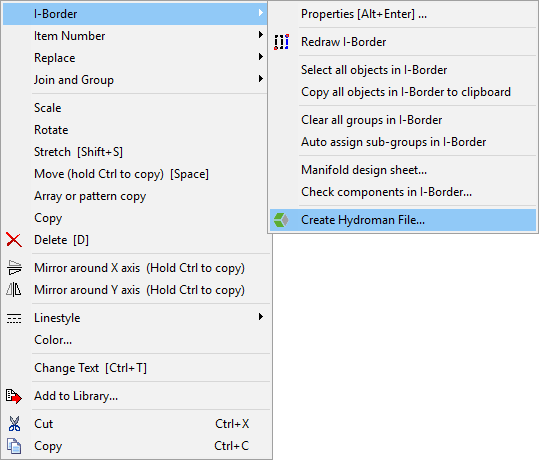
- Right-click the I-border and navigate to: [I-Border > Create Hydroman File…]{.menuchoice}
Note
If the HydroMan options aren’t available in your HydroSym, see link:/missing-article[Enable HydroMan]
- Change configuration (see section_title) and press OK when you’re ready to export.
- If there are any issues with your HydroMan file it will give you errors. For example; if a sub-group is used on multiple connections; all connections need unique sub-groups for exporting to HydroMan.
- If everything went OK, HydroMan should open and you can start designing. Please see the attached HydroMan – Quickstart.pdf for the most used functions.
Configuration options
The ‘Create HydroMan File’ dialog offers several options to customize the generated HydroMan file.

Select mode for create the file
- Start from scratch – use HydroMan’s default template
- Use a template – use a template from your library
- Update an existing manifold file – Update a file previously exported from HydroSym to apply changes.
Options
- Create ToDo list only – when exported you’ll start with an empty manifold and all parts in a ToDo list.
Tip
This is often used for very large manifolds to start with only the large valves
- Open created Hydroman file automatically – Opens HydroMan directly after exporting.
- Ask to open the created Hydroman file – asks whether to open HydroMan after exporting or not.
- Use single quotes for hole texts – port engravings will be shown on the drawing as MB instead of “MB”, and in the drilling list as ‘MB’ instead of “MB”
- Use faces that are set in the components – if you have already defined component locations in HydroSym (using F after selecting a component), it will export to HydroMan to that face.
- Place not defined components on the manifold – if faces are used; it will place all undefined components directly on the manifold after exporting; otherwise they go into the ToDo list.
- Use only hole texts (don’t add text to remark) – doesn’t indicate the port engraving in the drilling list; only on the drawing.
Use
- Non-US Hydroman files (metric) – Exports patterns with metric threads
- US Hydroman files (inch) – Exports patterns with UNC threads